
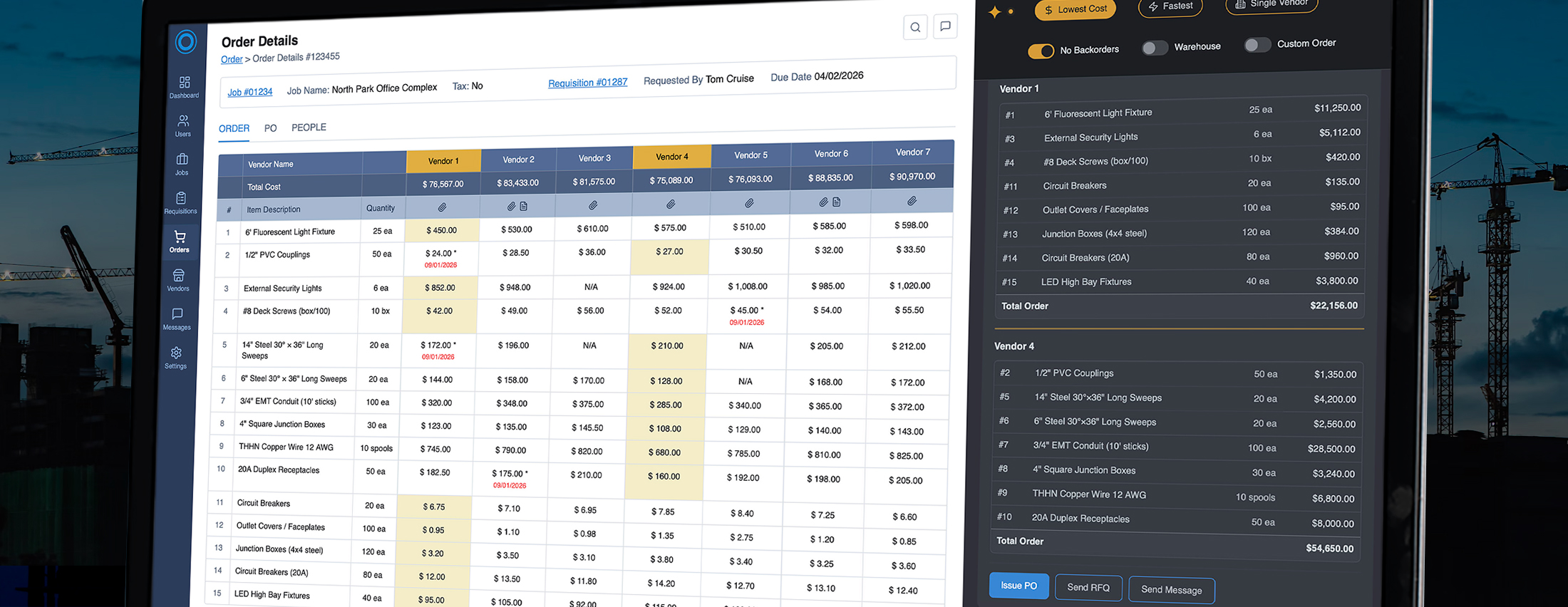
Complex procurement decisions, redesigned with AI
Electrical Construction Industry • Decision Engine • AI Product Design • Vibe Coding • Product Brief
ABOUT
The Collective is a purchasing management platform built for the electrical construction industry.
This project focused on redesigning a complex procurement workflow into an AI-assisted experience that streamlines order creation, accelerates vendor comparison, and supports faster, more informed purchasing decisions.
CHALLENGE
– To integrate an AI assistant into an existing manual order creation workflow.
– Personal challenge: To implement AI tools into the analysis, iteration, and design process, replacing traditional Figma with prompt-driven workflows.
IMPACT
→ Reduced decision time from ~20 minutes to ~3-5 minutes
→ Increased orders per manager
→ Reduced unnecessary vendor splits
→ Improved decision consistency and tracking
MY ROLE
Lead Product Designer
RESPONSIBILITIES:
– Product strategy
– Workflow redesign
– Research synthesis
– AI Interaction model
– Prototyping
– Visual design
WHEN
April 2026
TL;DR
I proposed two concepts to make order creation faster and easier
1. A decision-support model where the purchasing manager remains in control
2. A full AI copilot that takes on execution, shifting the user’s role from operator to decision-maker.
The AI Panel
OPTION 1
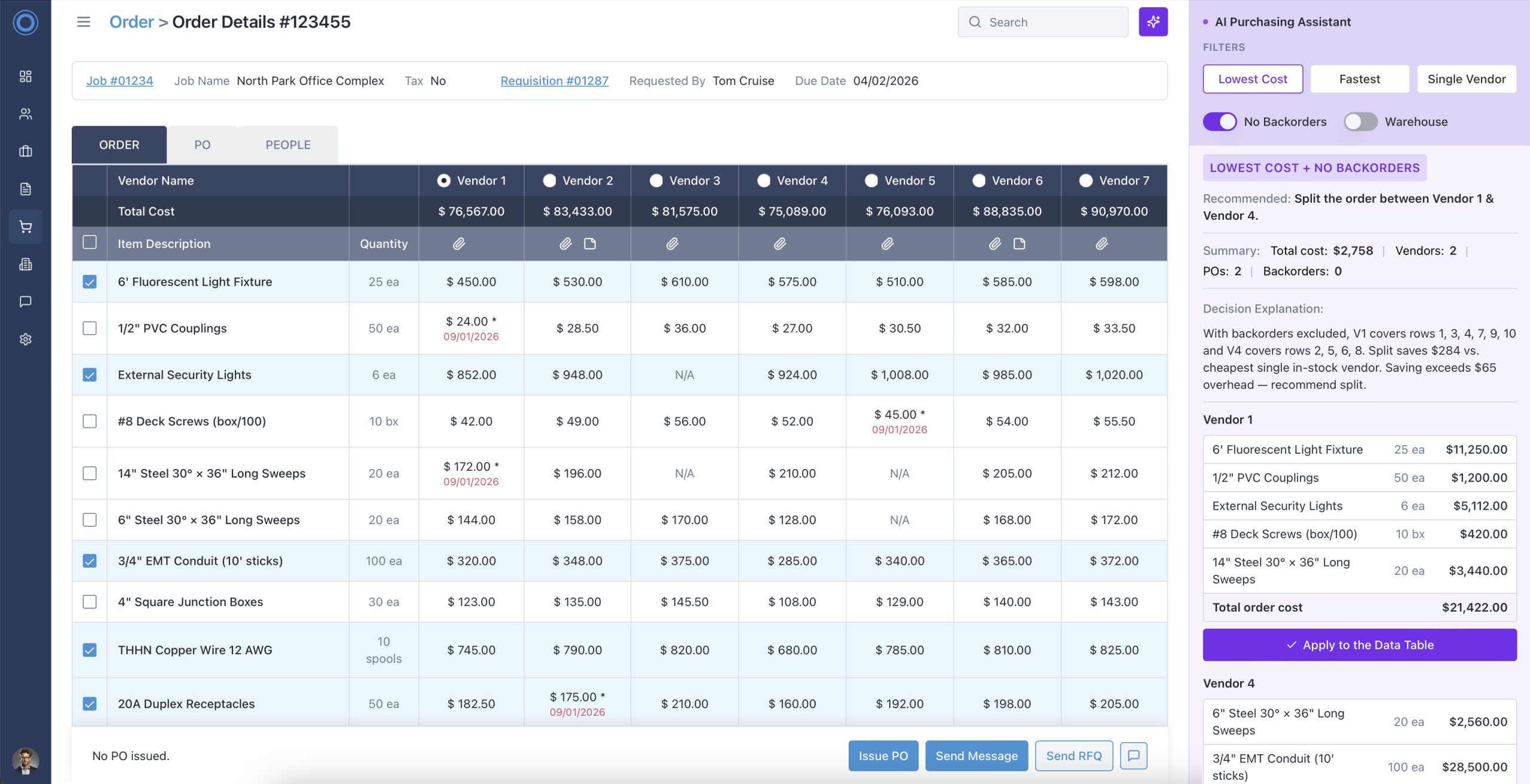
The main screen stays familiar. An AI assistant panel opens on the right side. The Purchasing Manager (PM) remains in control.
The AI advises, the PM decides.
→ PM activates the AI panel via an icon in the top-right corner
→ Mode selector (Lowest Cost, Fastest, Single Vendor) triggers instant AI recommendation
→ “Apply to data table” CTA pushes the AI selection into the grid, PM confirms and issues the PO
→ Split orders applied vendor by vendor, PM controls the final configuration
→ Manual override always available. The AI is a suggestion, not a constraint
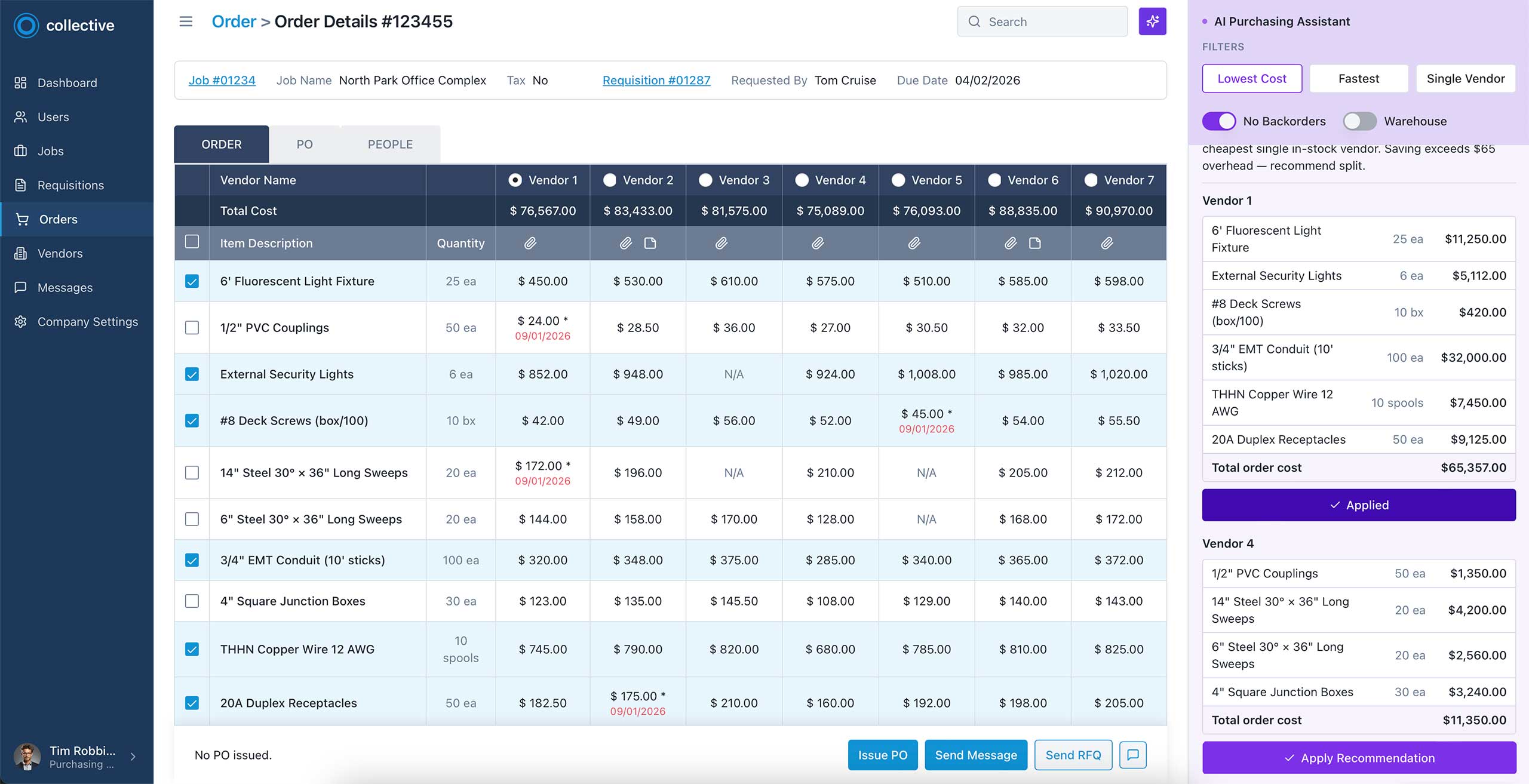
(!) Orders are limited to 12–15 items; 7 vendors are predefined by research.
The AI Copilot
OPTION 2
The data table becomes a visual read-out. All interaction happens through natural conversation with the AI.
The Purchasing Manager (PM) talks, the system acts.
→ PM communicates through a command-line interface — conversational, precise, context-aware
→ AI recommends orders, explains trade-offs, and surfaces vendor notes and PDF discrepancies proactively
→ Custom orders are created via conversation (e.g., “Give me Item 2 from Vendor 2, everything else from Vendor 4”), with the option to switch to manual mode and edit selections directly in the table
→ Post-PO editing, stakeholder messaging, and delivery follow-up — all through the same interface
→ The AI learns from each override — building a model of each PM’s preferences over time
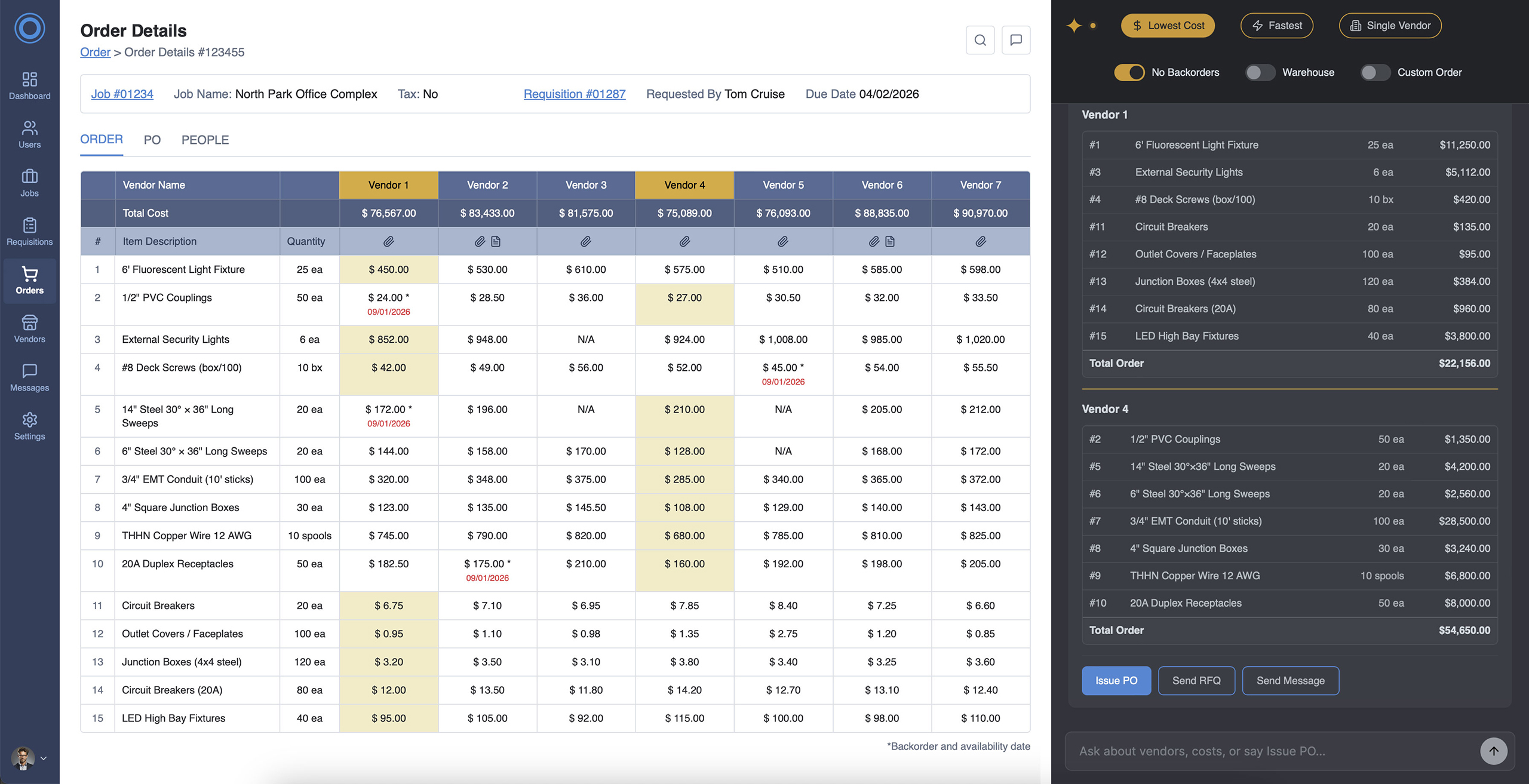
(!) Orders are limited to 12–15 items; 7 vendors are predefined by research.
The Story
In 2021, I led the design of Collective’s procurement management system for the electrical construction industry. The platform streamlined complex workflows among stakeholders and vendors, spanning thousands of line items, delivering significant cost savings.
It was a strong solution for its time, but today’s AI could meaningfully improve Order Management.
How is the order created?

Construction specialists requested materials for the job site from different vendors
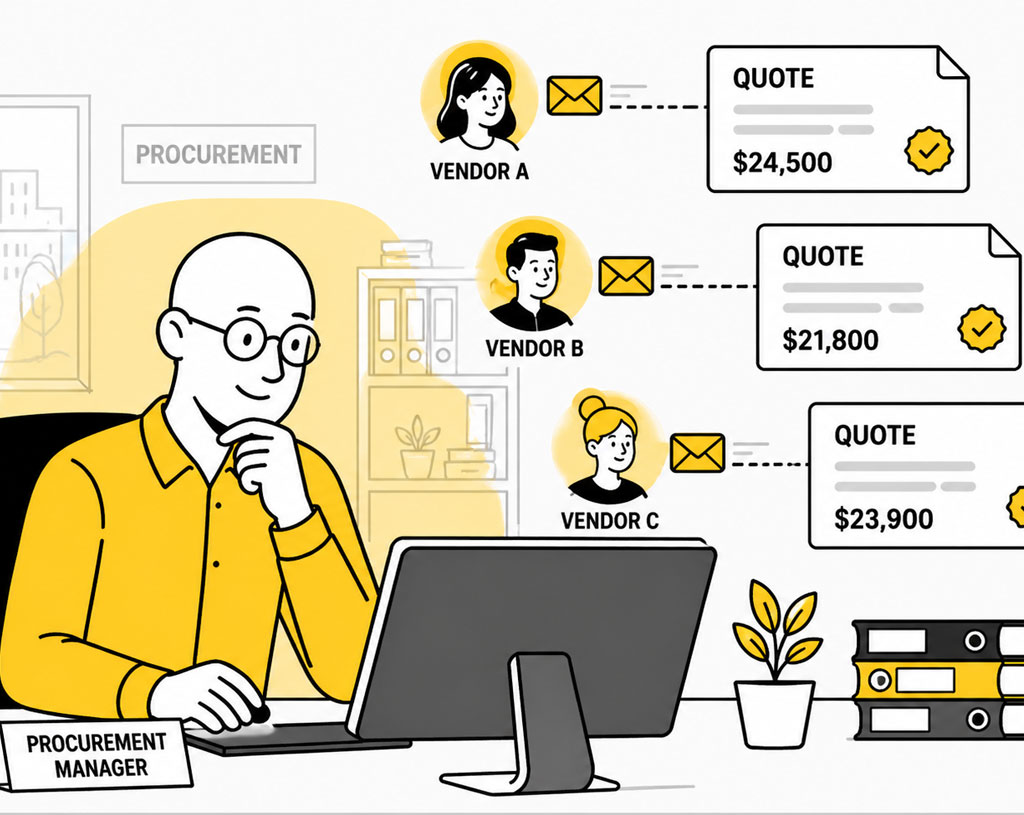
Vendors sent quotes to the Procurement Manager (PM)
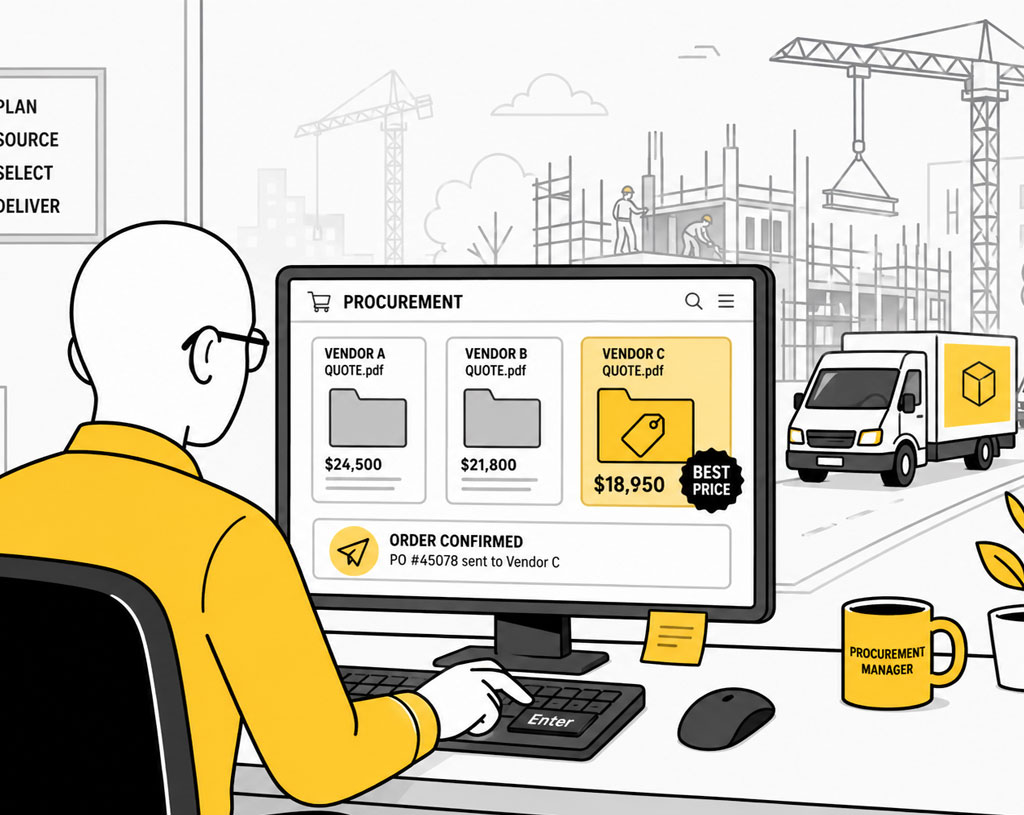
PM identifies the best price-delivery combination and executes orders for the job site
A 20-minute decision hidden inside one screen
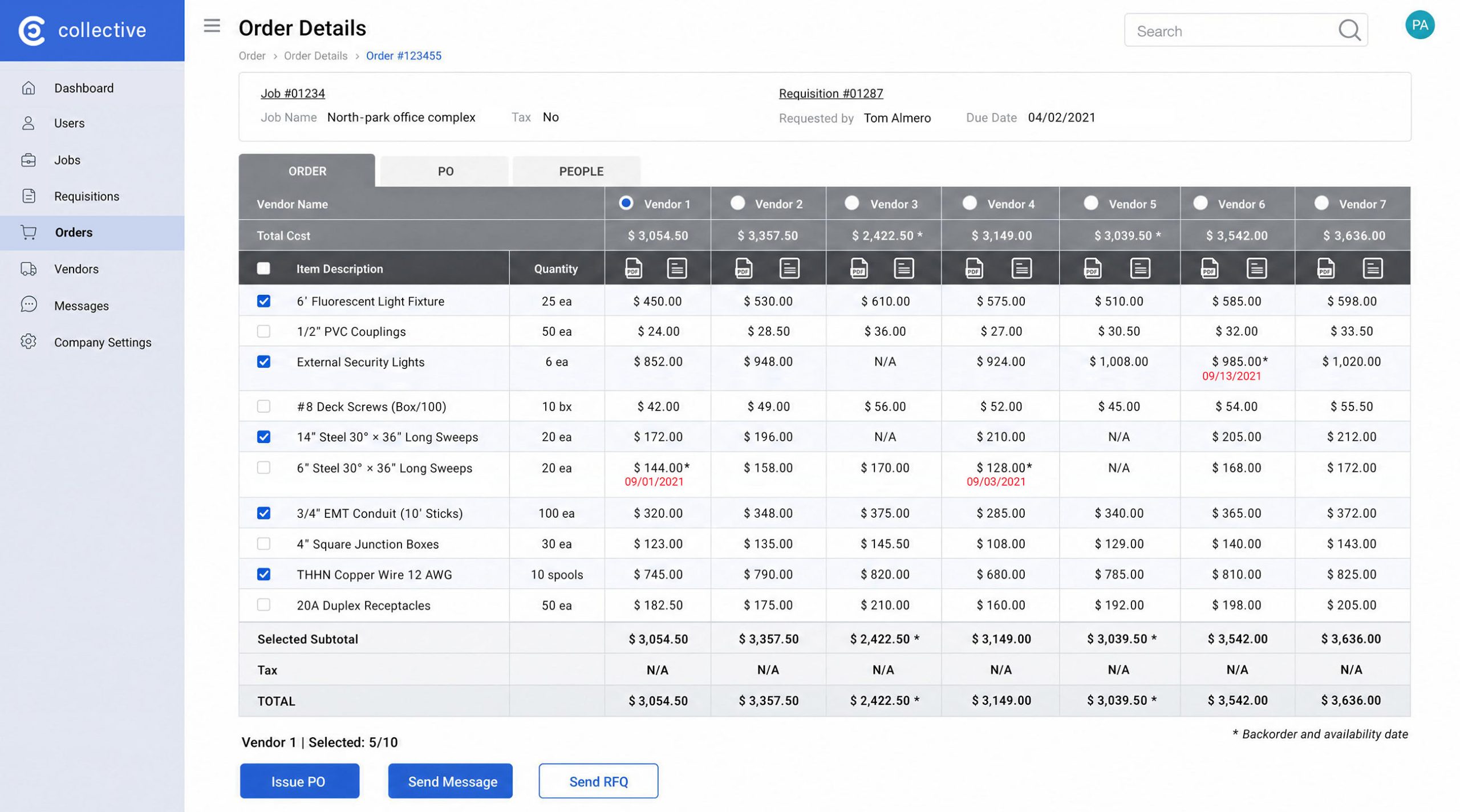
The procurement manager analyzes an order before creating a purchase order.
THE PROBLEM
Purchasing managers manually compared vendor quotes, checked backorders, reviewed notes, and decided how to split orders
This manual decision-making process created a high cognitive load, slowed order creation, and led to inconsistent vendor selection – reducing throughput per manager and increasing operational costs across all projects.
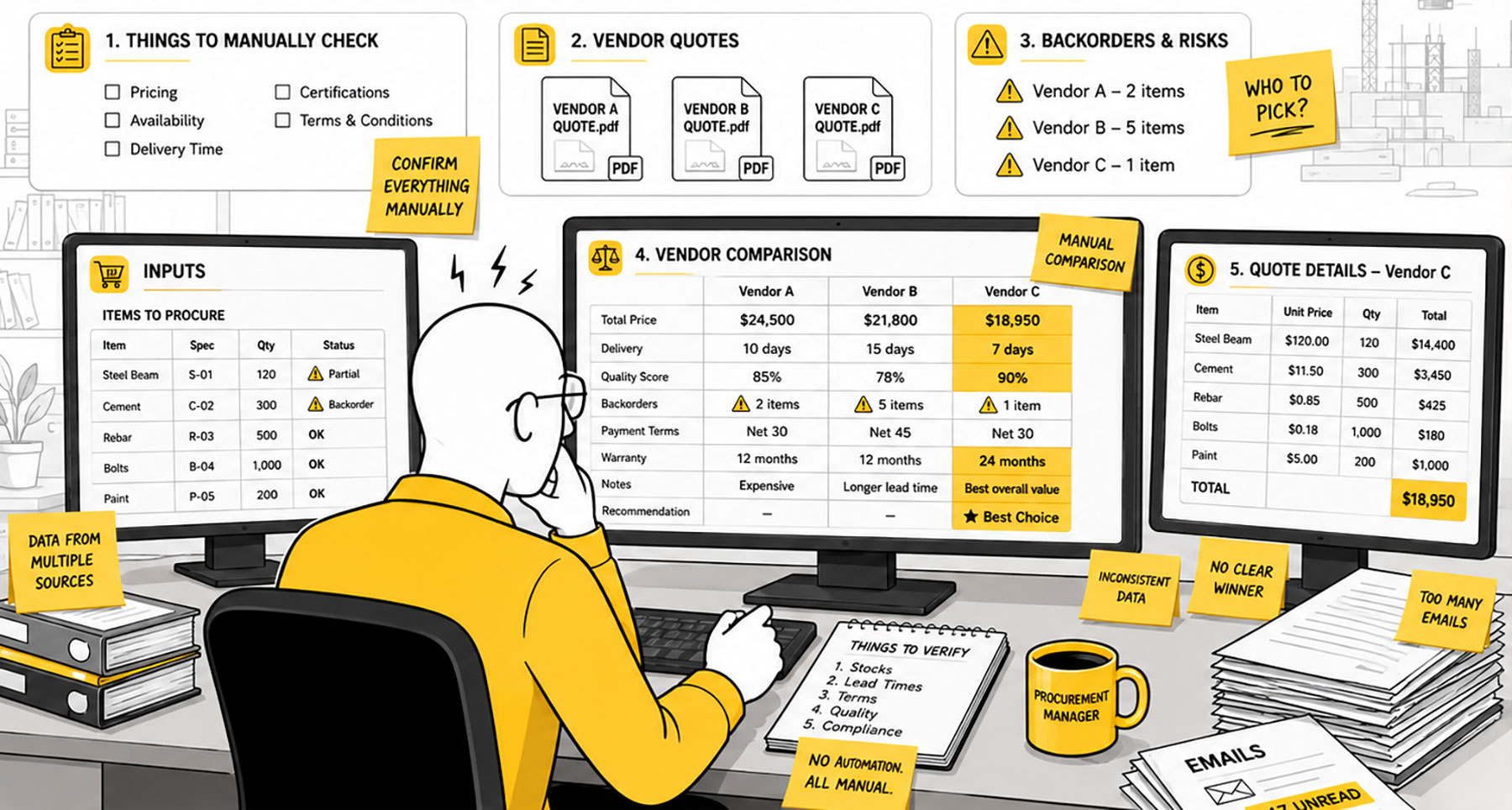
CORE INSIGHT
The user had become the system
Critical business logic lived in the purchasing manager’s head. The opportunity was to transfer repetitive computation from the person to the product.
CORE INSIGHT
Move procurement decisions from manual comparison to guided approval
Let AI handle analysis so the Procurement Manager can focus on approvals
STARTING POINT
Grounded in research
The Order screen was already fully functional. My focus was to identify opportunities to automate the routine work performed by purchasing managers.
I leveraged usability research from 2021, including interviews, task observations, and user feedback, and used AI to surface core use cases.
AI revealed 25 recurring procurement scenarios within the existing system.
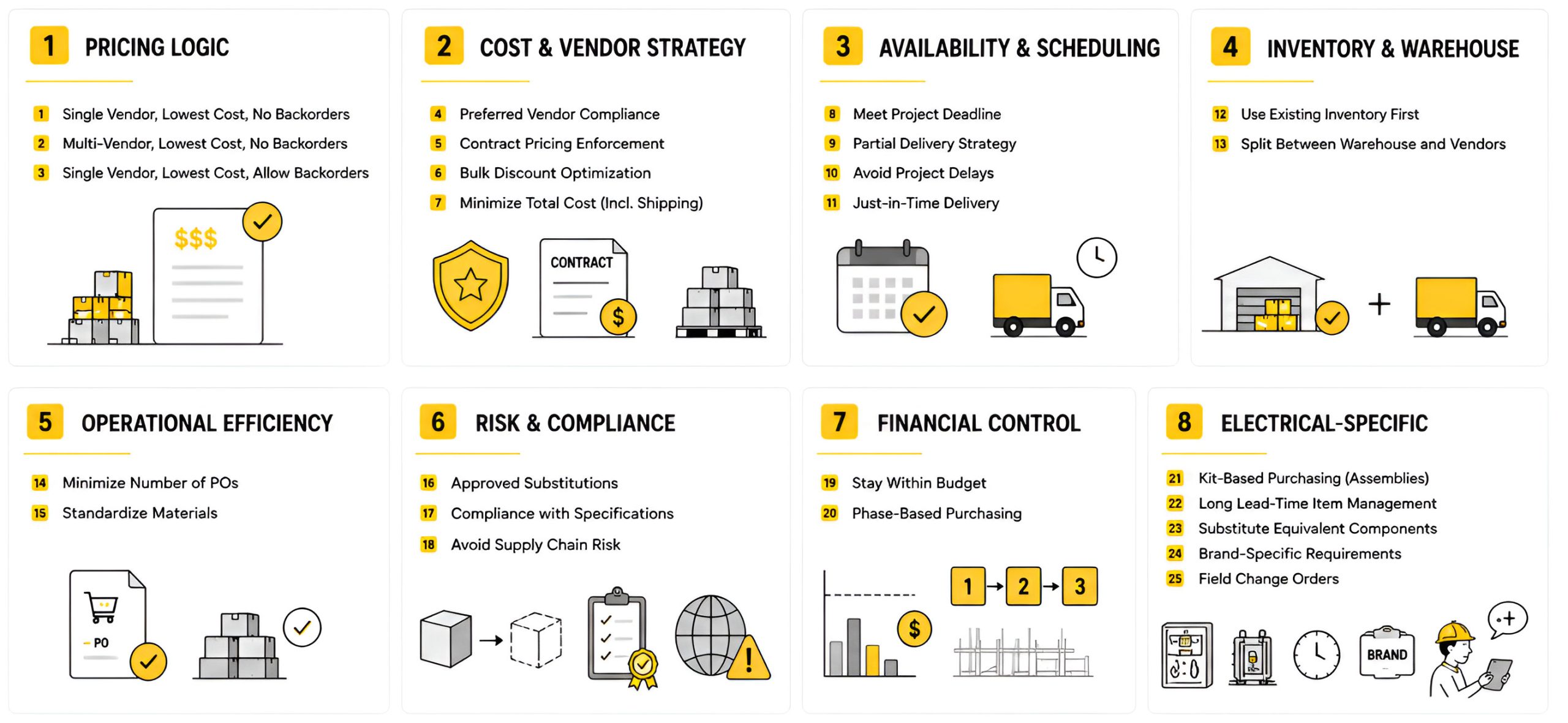
PRODUCT STRATEGY
AI Decision Modes into UI – 3 filter buttons and 2 constraint toggles
Turning 25 use cases into 25 separate AI modes would create unnecessary complexity and make the product hard to use. Instead, I reduced it to five decision modes.
The combination of these modes covers all scenarios while keeping the system logical, structured, and easy to understand.

Product Judgment Over AI
I excluded features that appeared valuable but lacked validation or a clear definition.
Excluded: Preferred Vendor
Reason: Required policy validation and broader business alignment.
Excluded: Best Value
Reason: Too ambiguous without measurable criteria.
KEY BREAKTHROUGH
Cheaper isn’t optimal
Stress-testing the logic produced strong results, but it revealed a critical blind spot: operational overhead was not accounted for.
Every purchase order initiates a downstream workflow. Each step consumes time, and time translates directly into cost and capacity loss.

Revised rule for AI Decision Engine
Use 1–2 vendors by default. Only recommend 3+ vendors when savings exceed operational overhead.
Clarity before execution
Before any visual work, I created a brief to centralize all knowledge and define exactly how the AI scores vendors, resolves conflicting constraints, determines which vendor notes must surface automatically, and what the PM’s role looks like once the AI absorbs the computational work.
Honestly, I hoped the AI would digest it and generate a ready-to-go prototype, and the job would be done, but instead, I got a messy screen that needed a lot of work.
Design
DESIGN PRINCIPLE
Not to disrupt an already effective workflow, but to enhance it through a gradual and thoughtful introduction of AI
DESIGN EXPLORATION
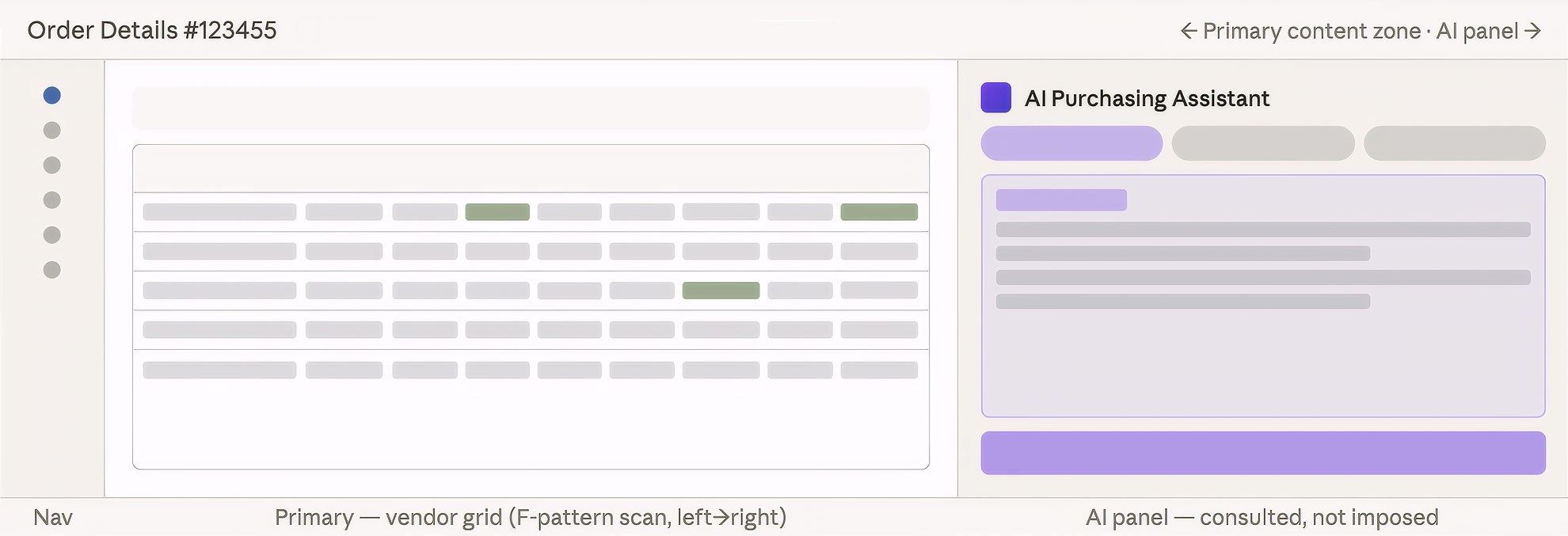
Layout map — how attention flows across the screen
Why it works
Maintains user familiarity
PMs already know this screen. Keeping the AI on the right avoids relearning and keeps the data where users expect it.
Supports natural work sequence
PMs scan the grid from left to right, then naturally shift attention to the AI panel. It’s a natural handoff, not an interruption.
Keeps the human in control
The AI recommends, but the PM stays in control. Keeping AI in a separate panel reinforces that suggestions are optional, not automatic.
Gradual AI adoption for PMs
PMs can start using the system normally without the AI panel. The AI is optional from day one and can be ignored. Adoption happens gradually, at the user’s own pace, as trust builds over time.
Reduces overload after scanning
The AI appears after grid scanning, when the PM is ready to interpret results. It answers the question they’ve just formed. No need to ask.
Centralized decision interface
All AI controls: modes, toggles, reasoning, and actions are grouped in one area, so the PM doesn’t have to search the screen to understand how the recommendation was made.
Main constraint
Separation between recommendation and data
The PM has to shift attention between the AI recommendation and the grid. It increases cognitive load.
AI Purchasing Assistant Panel
DESIGN EXPLANATION – OPTION 1
The Purchasing Manager reviews AI recommendations and makes their own decisions
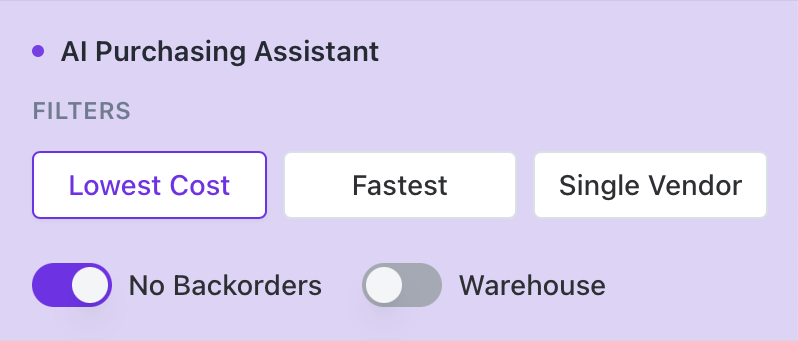
“Lowest Cost” + “No Backorders” toggle is the default configuration. It covers roughly 75% of orders and becomes the first recommendation the PM sees when opening the Assistant.
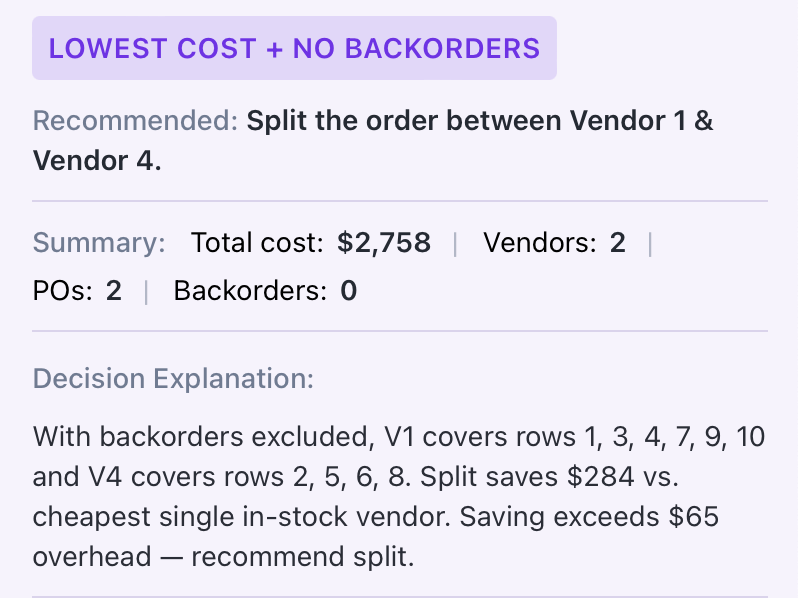
The order summary is the most important section. The PM sees the AI recommendation alongside the cost impact.
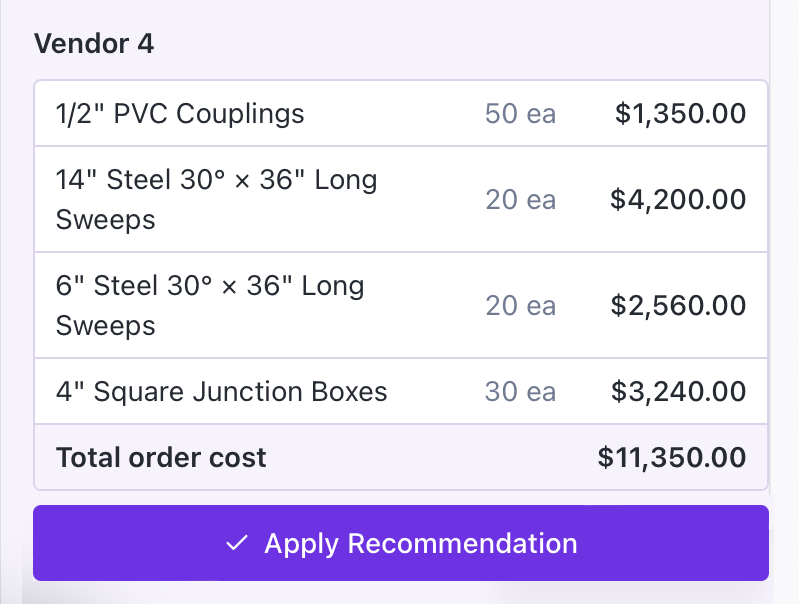
The recommended vendor summary table lets the PM review and apply vendor-by-vendor recommendations to the data table on the left. Once a vendor is applied, all related changes are immediately reflected in the left table, and the button state updates to “Applied”.
When the PM manually issues the purchase order for an applied recommended vendor, the AI assistant button states updates to “PO Issued”.
DESIGN EXPLANATION – OPTION 2
The data table becomes a live decision surface where the PM can directly talk to the AI Copilot
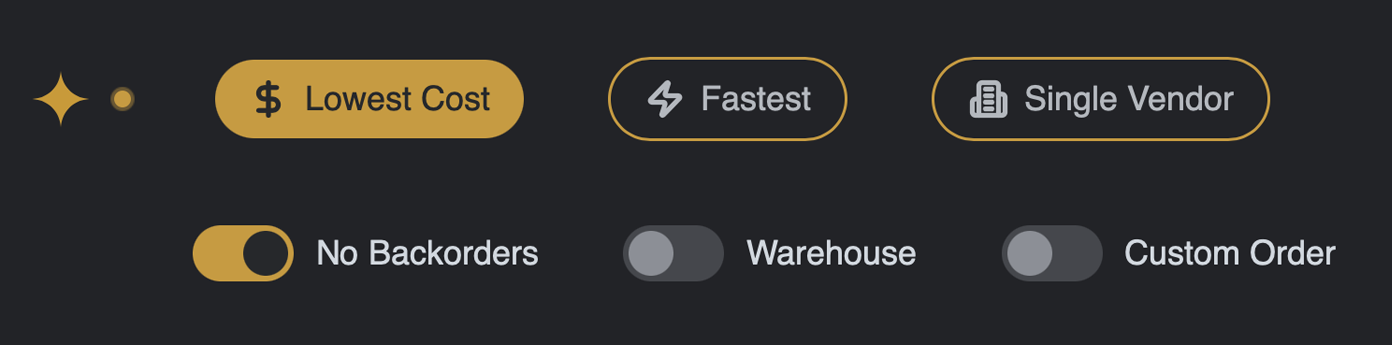
75% of orders are handled by the default setup of “Lowest Cost” + “No Backorders” toggle, while“Custom Order” allows the PM to manually configure and cherry-pick items when needed.
All filtered results are reflected in the left data table and highlighted in yellow.
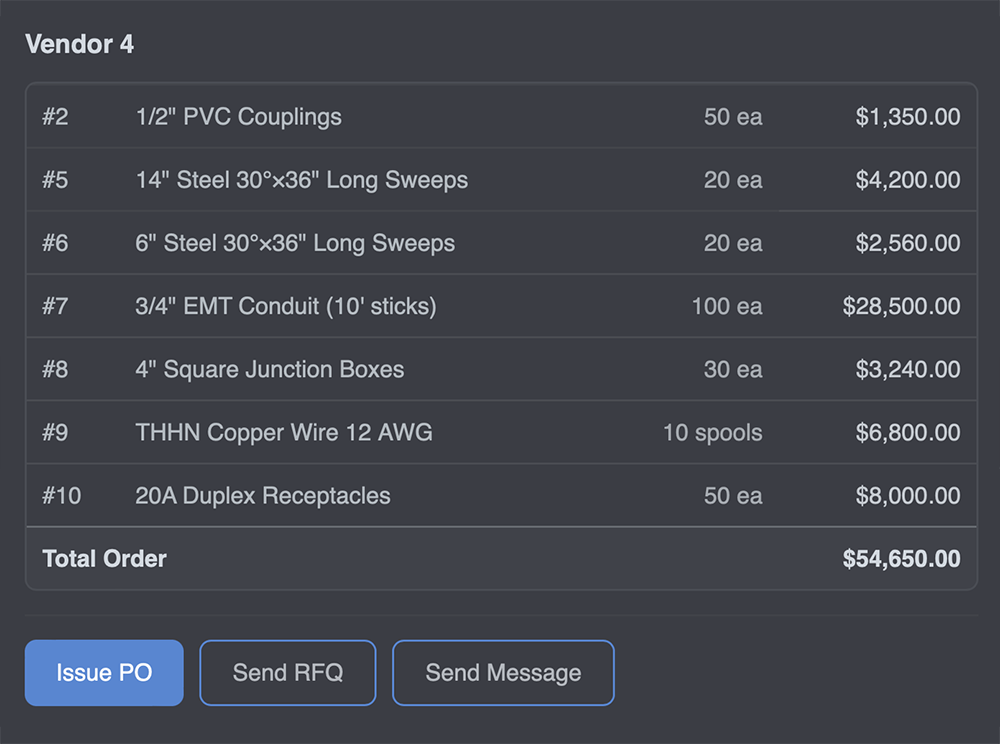
Issuing a PO to one or multiple vendors is possible through the AI Panel. Additionally, the PM can send RFQs and messages to stakeholders. No need to navigate through pages.

Through the chat interface, the PM can ask any question related to an order, such as red flags, vendor delivery history, and more.
This project is a local solution focused on the order creation function. A broader, system-wide AI implementation was not explored. With a global approach, the order creation flow could be redesigned in a different, possibly more efficient way.
Retrospective thoughts
The project focused on two areas of exploration:
1. Optimizing the procurement validation process to make it faster, more accurate, and easier to manage.
2. Learning how to guide AI with clear, intentional prompts to achieve reliable and consistent results.
→ Cheaper doesn’t mean better – automation without business context can turn the cheapest option into the wrong business decision.
→ AI needs constraints – strong AI products require clear rules and measurable logic.
→ Vague questions lead to vague answers – the quality of what AI produces is determined by the quality of what you ask for.
→ Trust is a product requirement – Even accurate systems fail without an adoption strategy.